
The ResetPasswordMfaWebAuthnPlatformChallenge class implements the reset-password-mfa-webauthn-platform-challenge screen functionality. This screen prompts the user to verify their identity using a platform authenticator (such as Touch ID or Windows Hello) as part of the MFA step during a password reset flow.
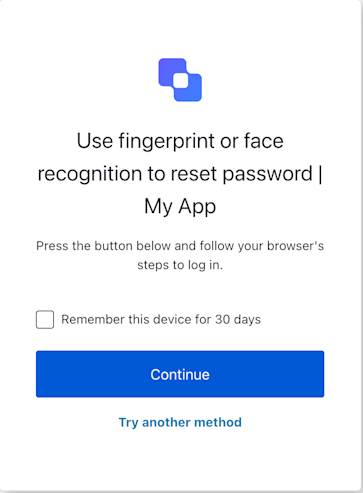
Constructors

Create an instance of ResetPasswordMfaWebAuthnPlatformChallenge screen manager
Example
import ResetPasswordMfaWebAuthnPlatformChallenge from '@auth0/auth0-acul-js/reset-password-mfa-webauthn-platform-challenge';

const resetPasswordMfaWebAuthnPlatformChallengeManager = new ResetPasswordMfaWebAuthnPlatformChallenge();
await resetPasswordMfaWebAuthnPlatformChallengeManager.continueWithPasskey({
  rememberDevice: true,
});

Properties

Provides branding-related configurations, such as branding theme and settings.
Provides client-related configurations, such as id, name, and logoUrl, for the reset-password-mfa-webauthn-platform-challenge screen.
Provides information about the user’s organization, such as organization id and name.
Contains data about the current prompt in the authentication flow.
Contains details specific to the reset-password-mfa-webauthn-platform-challenge screen, including its configuration and context.
Contains data related to the tenant, such as id and associated metadata.
Provides transaction-specific data for the reset-password-mfa-webauthn-platform-challenge screen, such as active identifiers and flow states.
Handles untrusted data passed to the SDK, such as user input during the MFA challenge flow.
Details of the active user, including username, email, and roles.

Methods

continueWithPasskey
(options ?)
This method initiates the WebAuthn platform authenticator challenge and submits the resulting credential to complete the MFA step during the password reset flow. If the browser throws a DOMException (such as user cancellation), catch the error and call reportBrowserError to notify Auth0.
Example
// Assuming 'sdk' is an instance of ResetPasswordMfaWebAuthnPlatformChallenge
try {
  await sdk.continueWithPasskey({
    rememberDevice: true // if user checked the box and sdk.screen.showRememberDevice is true
  });
  // On success, Auth0 handles redirection.
} catch (error) {
  console.error("Platform authenticator verification failed:", error);
  // If it's a WebAuthn API error (DOMException), report it
  if (error instanceof DOMException && error.name && error.message) { // DOMException check
    await sdk.reportBrowserError({ error: { name: error.name, message: error.message } });
  }
  // Check sdk.transaction.errors for server-side validation messages if the page reloads.
}
options
OPTIONAL
Optional payload.
reportBrowserError
(options ?)
This method reports a browser-side WebAuthn error to Auth0, such as user cancellation (NotAllowedError) or a timeout from navigator.credentials.get().
Example
// In your UI component, in the catch block of navigator.credentials.get():
// } catch (webAuthnError) {
//   if (webAuthnError instanceof DOMException) {
//     await sdk.reportBrowserError({
//       error: { name: webAuthnError.name, message: webAuthnError.message }
//     });
//   } else {
//     // Handle other types of errors
//   }
// }
options
OPTIONAL
Optional payload.
tryAnotherMethod
(options ?)
This method allows the user to select a different MFA method to complete the challenge.
Example
// In your UI component, when a "Try Another Method" button is clicked:
try {
  await sdk.tryAnotherMethod();
  // On success, Auth0 handles redirection to the MFA factor selection screen.
} catch (error) {
  console.error("Failed to switch MFA method:", error);
}
options
OPTIONAL
Optional payload.
getErrors
This method retrieves the array of transaction errors from the context, or an empty array if none exist.